Copilot Agents

From 3 Days to Minutes: Copilot Agents We Built — and How to Start Yours

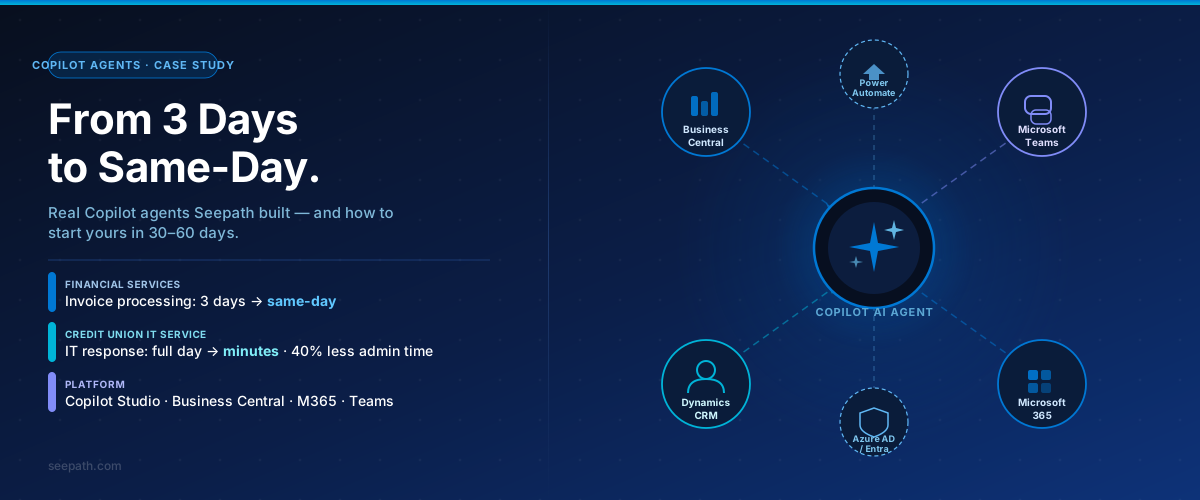
Two Copilot agents in production: a financial services firm cut invoice processing from 3 days to same-day, a credit union reduced IT response time from a full day to minutes. Here is what we built — and how to identify your first use case.

July 2, 2026 Seepath Solutions

This Week's Advisory

July 2, 2026

From Pilot to Production — What Changed

Most organizations started with Microsoft Copilot as an assistant — summ…

Agent Build #1 — Finance Automation: Business Central + CRM + M365

The client: A financial services firm processing ~200 customer and vendo…

Agent Build #2 — IT Service Agent for a 350-User Credit Union

The client: A credit union with 350+ employees running a service desk th…

How to Find Your First Use Case

Both deployments above started the same way: one use case, structured in…

How Seepath Can Help

Seepath has built and deployed Copilot agents across financial services,…

From 3 Days to Minutes: Copilot Agents Seepath Built for Clients — and How to Find Your First Use Case

From Pilot to Production — What Changed

Most organizations started with Microsoft Copilot as an assistant — summarizing meetings, drafting emails, retrieving documents on demand. That phase delivered value. It is also largely over.

The shift underway now is from assistant to agent: AI systems that execute tasks, update records, and trigger actions without a human initiating each step. This is already running in production environments, including two Seepath built this year for financial services and credit union clients — both live, both delivering measurable results inside 60 days.

Financial Services
Invoice Cycle: 3 Days → Same-Day

A firm processing 200+ invoices per month cut turnaround from 3 days to same-day. The agent matches, reconciles, and routes — finance staff review exceptions, not the full queue.

Credit Union IT
IT Response: Full Day → Minutes

A 350-user credit union replaced a shared email inbox with a Teams-based IT service agent. Response time dropped from a full business day to minutes. IT admin time on Tier 1 requests fell by 40%.

What Made It Work
Operational Design, Not Just Technology

In both cases the technology — Copilot Studio, Business Central, Azure AD — was ready. The differentiator was choosing the right workflow, scoping access correctly, and building governance in before go-live.

Here is exactly what we built — and a framework for finding your first use case.


Agent Build #1 — Finance Automation: Business Central + CRM + M365

The client: A financial services firm processing ~200 customer and vendor invoices per month. Reconciliation was manual — staff pulled data from Business Central, matched it against CRM records and bank statements, flagged exceptions, and routed approvals through email. Average turnaround: three days.

What we built: A Copilot agent in Microsoft Copilot Studio, connected to Business Central via the standard connector, with Power Automate handling orchestration and Microsoft 365 surfacing approvals and exception alerts in Teams and Outlook.

Finance staff type into Teams: "Show me unmatched vendor invoices from this week" or "Flag customer invoices over $10,000 not cleared in 48 hours" — and receive a structured response with records, status, and a direct action link.

Workflow Before After
Customer invoice processing 3-day average turnaround Same-day — automated match and posting
Vendor reconciliation 2–3 hours of manual work daily Under 30 minutes weekly — exceptions only
AR/AP matching ~40% auto-matched 90%+ auto-matched by the agent
Lead-to-CRM routing Manual entry, 24–48 hr lag Real-time CRM update on inquiry receipt
Marketing list refresh Weekly manual update Automated on contact activity change

The agent handles matching, flagging, and routing — and surfaces exceptions for human review. Finance staff now work through a clean exceptions list instead of the full queue. For the governance layer that makes this auditable in regulated environments, see our AI governance and Agent 365 advisory.


Agent Build #2 — IT Service Agent for a 350-User Credit Union

The client: A credit union with 350+ employees running a service desk through a shared email inbox. Password resets, MFA setup, application access, VPN troubleshooting — all queued until an administrator could respond. Average response time: one full business day.

What we built: A Copilot Studio agent deployed in Microsoft Teams, connected to Azure Active Directory for identity resolution, SharePoint for the IT knowledge base, and Power Automate for ticket creation and escalation routing.

Staff describe their issue in a Teams chat. The agent authenticates against Active Directory and either resolves it directly — password reset, MFA re-enrollment, access confirmation — or creates a structured ticket with full context and routes it to the right specialist, eliminating the back-and-forth email that preceded every resolution.

For the IT team, the agent acts as a first-line responder around the clock. Routine requests that previously consumed the first two hours of every administrator's morning are now resolved before staff start their day. IT admin time on Tier 1 requests dropped by 40%, with that capacity redirected to infrastructure, security, and projects requiring specialist expertise.

For credit union staff, the shift was immediate. A password reset that took a full business day now takes under five minutes. The agent handles approximately 60–65% of incoming IT requests without any human intervention.

In a credit union environment, governance design came first — agent capabilities second. Access is scoped to minimum necessary, every interaction is logged, and escalation paths are defined and tested before go-live.


How to Find Your First Use Case

Both deployments above started the same way: one use case, structured inputs, clear ownership, a measurable baseline. Organizations that stall do so by trying to deploy broadly from day one — identifying ten opportunities, building five proofs of concept, and delivering nothing production-ready.

The strongest starting use cases share four traits: the workflow is repetitive and time-consuming, inputs and outputs are structured, there is a clear business owner, and data access requirements are well-defined and limited.

Use Case What the Agent Does Typical Impact
Finance reconciliation Match transactions, flag anomalies, route exceptions 60–80% reduction in manual review time
IT helpdesk triage Classify, route, and resolve Tier 1 requests Resolution time: hours to minutes
Contract / document review Extract clauses, flag risk terms, summarize obligations 70% faster first-pass review
Customer intake / onboarding Collect, validate, and route data with CRM updates Onboarding time reduced 40–50%

The goal in the first 30–60 days is not ten agents. It is one agent deployed in a real workflow, with defined success metrics, a named owner, and measurable impact you can report upward. From that foundation, expansion is a structured decision, not a leap. See our Microsoft Build 2026 advisory on enterprise AI transition for context on where this is heading.


How Seepath Can Help

Seepath has built and deployed Copilot agents across financial services, credit unions, healthcare, and professional services — connecting agents to Business Central, Dynamics 365, CRM, and Microsoft 365 environments for invoice processing, financial reconciliation, IT helpdesk, and customer onboarding workflows.

What every engagement includes: a structured use case scoping workshop, data access design with minimum-necessary permissions, governance setup before go-live (logging, escalation paths, named ownership), and a 30-day hypercare period after launch. Agents are not handed off and forgotten — they are maintained, monitored, and expanded as the workflows they support evolve.

For context on cost visibility and ROI as you scale across multiple agents, see our Copilot and AI token economics advisory.

The organizations winning with AI agents are not deploying faster. They are deploying smarter — with the operational design and governance in place to scale what works and stop what does not.

Ready to move from experiment to production — or need to bring structure to agents already running in your environment? Talk to Seepath.


Ready to Get Started?

Talk to a Seepath expert about your Azure, security, or AI strategy — no sales pressure.

Contact Us

Weekly Advisories

Get the latest Microsoft security, Azure, and AI updates delivered weekly.

Subscribe

Want Personalized Guidance?

Seepath has been a Microsoft Direct Bill CSP since 2014 — serving financial services and healthcare organizations.
with hands-on Azure, security, and AI implementation.

Free Azure Assessment Talk to an Expert